|
12-bit vs 14-bit NEF |
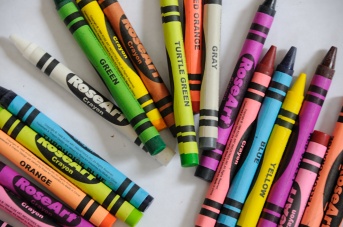
Original +0EV

-8EV out of camera JPEG - non black set to white
recovered photo - 14-bit NEF (-8EV test)

recovered photo - 12-bit NEF (-8EV test)
|
Is 14-bit NEF worth it?: On some Nikon DSLR's, switching to 14-bit has no speed impact,
but on the Nikon D300, 14-bit mode actually significantly
slows down how fast pictures can be taken -- from around 6/8 fps with a 45 ms shutter
lag, to around 2.5 fps with around a 100 ms shutter lag
(source).
So, what is the quality difference between 12-bit and 14-bit mode?
Is 14-bit really worth it?
Well exposed photos: At first, I was testing 'well exposed photos'. I
could find NO visible difference between 12-bit and 14-bit mode, no matter how
much I poked and prodded, and pixel peeped. The 'problem' is that it is
near impossible to isolate the lower bits of a tonal range in a well exposed
pixel value in Capture NX -- because all you can do is push the pixel value to
255. It is very hard to see more tonal range on an 8-bit tonal range computer
display.
Underexposed photos: The solution to isolating lower tonal range bits?
Dramatically underexpose a photo on purpose so that the only thing remaining
is not the significant bits of a pixels value (which are then all zero), but
the lower bits, and then compare 12-bit vs 14-bit mode.
The test: A D300, on a tripod, and take
a NEF+JPG picture in 'P' mode. Take note of the exposure
settings and replicate them in 'M' mode. Then purposefully adjust
shutter speed minus 8EV. Then take a picture
in 12-bit mode, then again in 14-bit mode. Here are the raw files:
Results: The resulting OOC (out of camera) JPEG looked 100%
black, and essentially was. For full disclosure, to the right
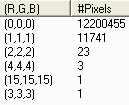
is a map of every single color recorded in the OOC JPEG. A TIFF
produced within NX had far fewer non-black pixels, indicating that
most non-black pixels in the OOC JPEG were just JPEG artifacts in
the first place. So job accomplished. All significant bits are
effectively zero. In conclusion, the OOC JPEG was a lost cause --
as it resulted in a 'black' photo.
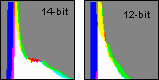
Recover the photo (12-bit vs 14-bit): Editing the NEF's
results in what you can see to the right
(contact us if you can't figure out
how it was recovered).
I spent less than a minute on the 14-bit NEF, with good
results very quickly. I had to spend a lot more time on the 12-bit
NEF, attempting to coax quality out of the bits, and correct for
a green color cast.
Clearly, NEF is far superior to JPEG, and there are small
and subtle differences between 12-bit and 14-bit NEF.
Also, if you look carefully, you can see the 'columns' in 12-bit
mode, but not in 14-bit mode. These 'columns' can even be seen
in -4EV situations (in the shadows of well exposed photos). Very
strange! At least in the D300, the implementation of 12-bit and
14-bit are very different.
High ISO 14-bit is actually better: I was first under the
impression that 14-bit in high ISO gained you nothing (only record
more noise). But I have changed my mind after pixel peeping at ISO
6400 in both 12 and 14 bit NEF on a D300. A difference (for the better) can be
seen in 14-bit modes. There is practically the same (subtle
difference) dynamic range between 12 and 14 bit NEF. The difference
is in the tonal values recorded, which in high ISO for some reason
made a difference? Technically, this should not be so (14-bit 'should'
only record more noise). But it may indicate larger implementation
differences between 12-bit and 14-bit modes. More research is needed
to find out why this is.
There does appear to be a major implementation difference in the D300
between 12-bit and 14-bit modes. Just look above at the columns that
can be seen in low light 12-bit mode, but not in 14-bit mode. I suspect
the only reason high ISO looks slightly better in 14-bit mode is because
of this unknown implementation difference between it and 12-bit mode.
Conclusions: NEF is far superior to JPG in recording detail in deep
shadows (black). 14-bit NEF is better than 12-bit NEF, but typically only if you
are going to modify your photo and attempt to pull detail out of dark areas of
your photo (or if you are going to be using high ISO). There is evidence online
that clearly shows it eliminates banding in dark areas of well exposed photos
on the D300.
An observation: What all this means is that if you find yourself
ever using 'Exposure Compensation' within NX to brighten a photo, you
will benefit from the extra bits of 14-bit mode (over 12-bit mode) that
are there in a NEF to fill in the deep shadows.
Why does 14-bit have (slightly) more dynamic range than 12-bit: When
you examine these two NEF, why does the 14-bit NEF capture more dynamic range
recorded than the 12-bit NEF? One possibility is a 'truncation' behavior in
the A/D (analog to digital) converter inside the camera. Namely, in 12-bit mode,
the 12-bit number of '4' is used to represent the 14-bit mode numbers of 16, 17,
18, and 19. Or looking at it another way (normalize the 14-bit numbers back to
12-bit numbers), 4.0, 4.25, 4.5, and 4.75. So for a particular number of photons
at a pixel location, the A/D converter might generate the number 4 in 12-bit mode,
but the number 19 (4.75) in 14-bit mode.
But based upon the 'column' behavior seen above, there is more going
on between 12-bit vs 14-bit than what we can deduce (only Nikon knows
the real reason).
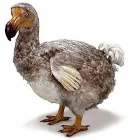
Don't be a dodo:
From the test above, you can clearly see that even
though the JPEG was a hopelessly lost cause (pure black pixels), we were
still able to go back to the original NEF and recover a decent
recognizable image (recover black into something non-black). This
test directly contradicts crazy statements about RAW vs JPEG that
you can find on the web, like this one, by a self-proclaimed
expert:
"Raw records usually with 12 bits, but a linear 12 bits.
JPG uses only 8 bits, but these are after the log and
gamma conversion, and thus preserves the 12 bit
precision at the shadow levels where it's important!" - Ken Rockwell
But Nikon says that a NEF contains
"far greater tonal range than an eight-bit JPEG or TIFF file"
( source).
And the tests above confirm what Nikon says. source).
And the tests above confirm what Nikon says.
Use some common sense when browsing the web! Extraordinary claims require
extraordinary proof. If you blindly follow the (bogus) claims of self-proclaimed
experts on the Internet -- without any supporting evidence -- you will get
burned.
|
 If NX101.com helps you, help this site by making a donation.
|