 |
Capture NX Dynamic Range |
A NEF is a record of what a camera image sensor saw. Therefore, a NEF captures the
raw linear light levels seen by the camera's image sensor, in either 12 or 14 bits
of precision.
 Question: When you start using NX Adjustments, like Contrast, Brightness,
etc, do you have full access to the entire dynamic range (12/14 or so EV)
present in a NEF?
Question: When you start using NX Adjustments, like Contrast, Brightness,
etc, do you have full access to the entire dynamic range (12/14 or so EV)
present in a NEF?
Answer: No! The answer is counter-intuitive, and maybe one day
Capture NX will allow it, but as of now (NX 2.3.2), the
answer is a surprising no, you do not, and a very simple test (below)
will prove this to you.
The details: Instead, almost all Adjustments only have access
to the dynamic range of the color space (usually RGB) that you are using
to edit a photo -- a color space which was derived from the NEF.
When converting from a NEF to a color space, all information outside of
a color space's ability to record a color is lost for good.
Capture NX adjustments operates on a color space,
which is a subset of the information in a NEF.
Why is this? The NEF has overexposure (and underexposure) headroom
built into it. This means that the dynamic range of a well exposed photo derived
from a NEF is less than the NEF dynamic range. The only Adjustment that can
access this 'excess' dynamic range information is 'Exposure
Compensation' under 'Develop/Camera Settings'' (details below).
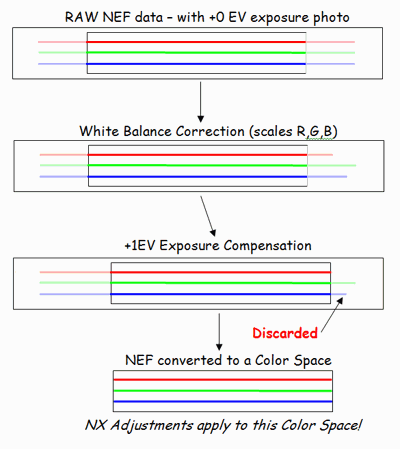
NEF to color space conversion: The process whereby Capture NX creates a RGB photo
for you to edit and apply Adjustments to is illustrated to the upper right.
The steps are:
- First, White Balance corrections
can end up changing reds and blues (and sometimes green) in the NEF linear color
space.
- Next, Exposure Compensation
selects which part of the NEF dynamic range will be used to create the RGB photo
to edit.
- Optionally, there are Active D-Lighting and other RAW Adjustments, which for
purposes of illustrating this point, don't matter.
- Finally, a tone (and gamma) curve is applied to the linear values to create
gamma-ccorrected colors in a particular color space (like RGB). The end result
is values from 0 to 255, with any values outside that range thrown away!
A test that confirms color information being thrown away in the NEF to color
space conversion:
A very simple test will clearly illustrate the truncation
of the upper EV end of the dynamic range. Take a picture inside a house towards a
window, with proper expsoure for inside the house. The result is a 'blown out'
window. Then edit in Capture NX and 'View' / 'Show Lost Hightlights' (everything
non-black is 'blown out' or has a maximum/255 pixel value). No amount of non-RAW
Adjustments can recover the detail in the blown hilight.
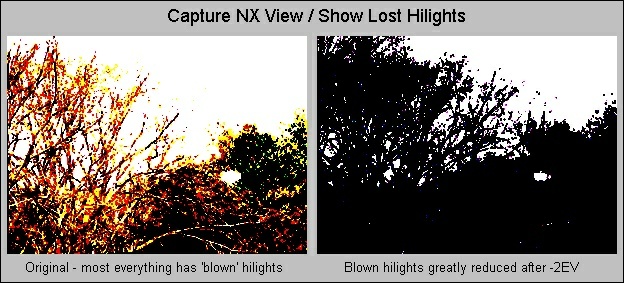
Now change the Exposure Compensation under 'RAW Adjustments' to -2EV and you
can clearly see that some of the lost highlights have been "recovered". Clearly
the information is present in the NEF, since it was 'recovered', but was not
available to you for editing via Adjustments prior to the exposure adjustment.
Only 'White Balance' and 'Exposure Compensation' can access the full
NEF dynamic range: The only adjustments that have access to the
full NEF dynamic range are located under 'Camera Settings'. Note that
many of the adjustments under 'Quick Fix' operate on a color space, and not
on the raw NEF.
The lesson learned: You must maximize the quality of the information
in the color space before working on the color space. That means, first,
perform 'White Balance' corrections first. Then, perform 'Exposure Compensation',
using 'View / Show Lost Highlights/Shadows'
to assist you:
Internal workings of Capture NX
Internal 0-255 RGB value clipping: When performing adjustments on RGB pixel
values, any result lower than zero is set to zero, and any result greater than
255 is set to 255. This is clearly seen if you take a +4 EV test photo's NEF,
apply a Contrast Adjustment (of +98), and then try to recover with a
negative Contrast Adjustment. All you end up with is gray. Proving the
first contrast adjustment clipped pixel information (it would have been restored
if there was no clipping).
Fast vs Slow Algorithms: I was playing around with
Capture NX making adjustments, resulting in nearly a black image, walked
away, and came back later to find the black had turned to white. Very
unexpected.
After much investigation, I discovered that NX apparently attempts to provide
instant image feedback (apparently using low quality algorithms or low bit
depth for speed), but then behind the scenes, uses higher quality algorithms
(or bit depth) to calculate the 'final' image, which is then displayed,
possibly much later, possibly even after the exclamation mark
in the title bar has gone away. If the RGB histogram contains 'bars' and is
not a smooth curve, NX has not finished updating the photo behind the scenes.
|
 If NX101.com helps you, help this site by making a donation.
|


