|
NX Gamma Tests |
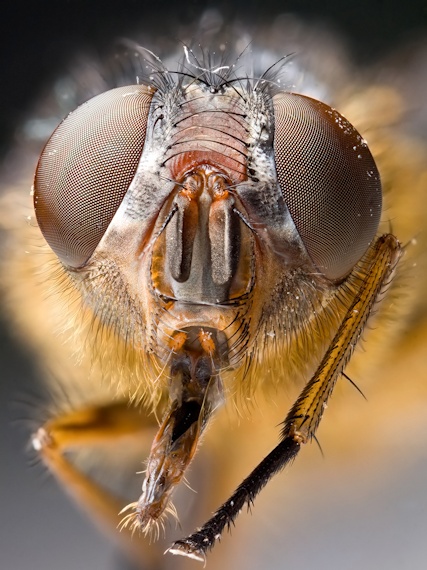
Roll mouse over to see Capture NX resize gamma problem
|
Gamma encoded color spaces: Capture NX (2.3.2) takes a NEF,
and converts it to a
gamma encoded color space
(like sRGB or AdobeRGB), and presents that to you within NX for editing.
But, the only problem with this is that some (all?) adjustments
within Capture NX are not gamma aware.
Why you should care: Not being 'gamma aware' means color shifts --
and since you are editing a NEF in the first place (instead of a JPEG), I
am going to assume that you care about color accuracy.
An Example: Have you ever
resized a photo for the web and noticed that you needed to brighten it
slightly after resizing? If so, that was caused by your program not
being gamma aware.
Consider the calliphora photo to the right
(original photo).
Looks nice? It was resized in a gamma aware manner. But, roll your
mouse over the photo to see how Capture NX resizes the photo.
Most people will never notice that NX Adjustments are not gamma aware. Most
photos are well exposed and rarely heavily modified. But if your photo contains
abrupt changes in contrast or color, or needs heavy editing, you will notice subtle
shifts in color. I have noticed color shifts in several spots. (1) With
D-Lighting, (2) in the recovery of extremely
underexposed areas of photos, and (3) resizing photos smaller for the web.

Gamma Test Image
|
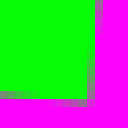
Classic Gamma Test Image: A classic gamma test is to create the image that
you see to the right (green square over purple background) in your favorite image
editing program and manipulate it (in NX, use this
example.nef, produced with two
colorize steps).
The colors in this test image are very carefully chosen. The purple is RGB (255,0,255)
and the green is RGB (0,255,0). These colors stay the same before/after
gamma encoding/decoding. So we can then examine the averaged area between
the purple and green to see if an photo editor is gamma aware.
It does not matter what color model you use! However, the internal
RGB values in the color model must be set to the values as specified above.
It is an ERROR to produce these RGB values in one color model and then convert
the colors to a second color model (which will change the internal RGB values).
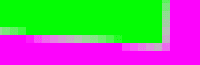
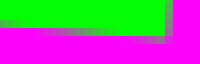
GOOD gamma aware result
BAD non-gamma aware result
|
Background: What happens when you rotate this test image? Some purple
and green will have be 'averaged' together. Take the very simple case of one
purple pixel (255,0,255) and one green pixel (0,255,0) that need to be averaged
together. The result in a non-gamma aware program will be (128,128,128), which
is half of 0+255 for red, green, and blue. But a gamma aware program would need
to convert to linear (which is why the colors were chosen carefully -- the result
is the same color), then averaged, which is (128,128,128), and then gamma encode
that, resulting in (186,186,186). The results are obvious to see. (128,128,128)
is dark color, whereas (186,186,186) is much lighter.
The Test: Rotate the test image by 5° and compare the results to
what is expected from a gamma aware vs non-gamma aware program. A gamma aware
program will have a pleasing white'ish blending. A non-gamma aware program will
have an incorrect dark blending color.
Capture NX Test Results: Here are the test results for various Adjustments
within Capture NX.
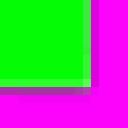
Distortion Control
| |
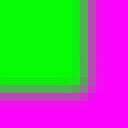
Gaussian Blur
| |
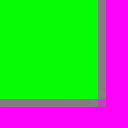
Resize
| |
Straighten
|
Given the dark blending seen, we can conclude the adjustments are not
gamma aware. Given that these adjustments fail, I need to question if there
are any adjustments within NX that are gamma aware.
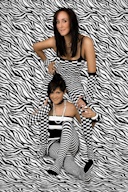
More examples: There is an entire class of visual arts, called 'op art'
(optical art) that is also noticeably affected, due to ultra-high contrast photos.
Consider the
 op art photo
seen far right. Roll the mouse over to see how Capture NX resizes and
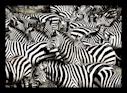
notice the color shift towards black. Also, a simple
photo of zebras
is also affected, due to the high contrast. op art photo
seen far right. Roll the mouse over to see how Capture NX resizes and
notice the color shift towards black. Also, a simple
photo of zebras
is also affected, due to the high contrast.
Why the shift towards black? Because a gamma unaware program
will average black (0,0,0) and white (255,255,255) and produce an incorrect
(128,128,128), which after gamma decoding by your physical CRT/LCD, equates
to a linear color of (55,55,55), or gray at 22% intensity. However, a gamma aware
program will average the two colors and produce (187,187,187), which after gamma
decoding by your physical CRT/LCD, equates to a linear color of (128,128,128),
which is gray at the proper 50% intensity.
Capture NX needs to be fixed: Presenting gamma encoded RGB to edit
with non-gamma aware Adjustments is a design flaw, which only leads to shifts
in color when the RGB values are edited -- as can be clearly seen in the above NX
tests. Since many (all?) adjustments within NX are non-gamma aware in the first
place, moving when gamma encoding takes place is the best way to fix NX.
Currently gamma encoding in NX appears to be a hidden first step (when a NEF
is converted to a color space -- and both the sRGB and AdobeRGB color spaces
are gamma encoded color spaces).
How Nikon could easily fix Capture NX: Nikon needs to change when gamma encoding
takes place within NX. And the solution to fix all of NX at once is deceptively simple.
Gamma encoding in NX is currently a (hidden) automatic first step (with your screen/monitor
being the gamma decoder). Instead, gamma encoding must instead be an automatic last step
-- so that all adjustments work on linear color values.
See the fix for yourself! In NX: (a) add a first step with a gamma of .45
(Levels&Curves midpoint slider) to undo gamma correction and create a
linear color space; (b) perform adjustments on these linear colors (like an
image resize); (c) add a final step with a gamma encoding of 2.2.
Nikon Acknowledges the problem: I first reported the problem with
Capture NX1 to Nikon in March of 2008, and again in February 2009 after I
installed NX2. Nikon acknowledged that the gamma issue had been passed
onto "Nikon QC".
|
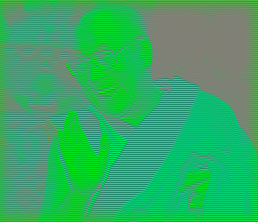
Another very clever Gamma Test: Thanks to Eric Brasseur,
who created a very extensive web page on the subject,
for the following test image. Save the following specially created
258x222 Dalai Lama photo to your computer (right click on the picture, select
'Save Picture As...') and open in your favorite image editing program, then resize
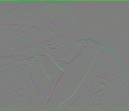
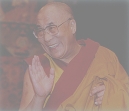
to 50% (129x111). What do you see as a result? A non-gamma aware program like
Capture NX will produce a gray square. Something that you can see is
incorrect. A gamma-aware program will produce the result that we can see
is correct:
Original 258x222 test image
| Resize 50%  |
NON-gamma aware resize
Gamma AWARE resize
|
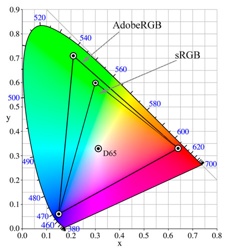
sRGB vs. AdobeRGB
|
Color Profile Warning: I have seen
posts
on the Internet
slamming the above discussion, claiming that if only the above photos were converted
into the
Adobe RGB Color Space
that the 'problem' goes away. Of course the problem goes away!! Because
by converting from sRGB to AdobeRGB, the very carefully selected internal
RGB values are altered! These posts only confirm that color spaces are
horribly misunderstood.
RGB(0,255,0) in sRGB, when converted to AdobeRGB, is changed to RGB(144,255,60).
And RGB(255,0,255) in sRGB is converted to RGB(219,0,250)!
The above tests are about setting very
particular RGB values within any color profile and seeing how NX2 handles
the result. As such, use any color profile that you want -- but the color profile
must be applied so that particular RGB values in the test above are performed.
Adobe RGB version: Here is a NEF
with two versions in it (both in the Adobe RGB color space): (a) a non-gamma aware resize;
and (b) extra gamma decoding and encoding steps that make the image resize gamma aware.
Select the version you want to see from the 'Version' list in the Edit List.
VIDEO: Gary Fong on sRGB vs. AdobeRGB - don't use AdobeRGB until you listen to this first
|
 If NX101.com helps you, help this site by making a donation.
|